
The cheapest legitimate way to use Canva Pro in the UK depends on what you qualify for and how long you need it. Canva Free costs £0. Eligible school users can access Canva Education free, some university students may get Canva Campus through their institution, eligible nonprofits can apply for free premium access, and Canva currently lists Pro at £100/year for one person in the UK. If you only need premium features for a fixed period, a clearly described fixed-term option can cost less overall than paying Canva directly for a full year.
The phrase “cheap Canva Pro UK” leads to very different kinds of offers online. Some are official ways to pay less. Some are independent services with different billing and support terms. Others rely on vague “lifetime” promises, shared credentials or regional-pricing tricks that are hard to trust.
This guide separates those options so you can compare price, eligibility, flexibility and risk rather than choosing the lowest headline number.
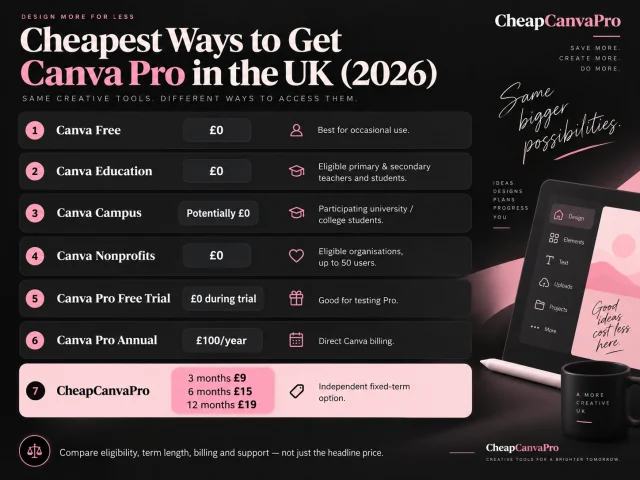
The cheapest Canva Pro options in the UK at a glance
Start with the broadest comparison first: which option is free, which requires eligibility, which is best for direct Canva billing and which fits a fixed-term need.
| Option | What you pay | Who it suits | Important condition |
|---|---|---|---|
| Canva Free | £0 | Occasional users | Pro-only tools remain limited |
| Canva Education | £0 | Eligible primary & secondary teachers and students | Eligibility or school access required |
| Canva Campus | Potentially £0 | University / college students at participating institutions | Access is managed by the institution |
| Canva Nonprofits | £0 | Eligible organisations | Application and approval required |
| Canva Pro free trial | £0 during trial | People testing Pro | Duration and renewal terms are shown at signup |
| Official Canva Pro annual | £100/year | Regular individual users | Direct Canva billing |
| CheapCanvaPro fixed-term | 3m £9 · 6m £15 · 12m £19 | People who want a lower-cost defined term | Fixed-term access with defined support terms |
1. Start with Canva Free before looking for a discount
The cheapest Canva plan is still Canva Free at £0.
That sounds obvious, but it is also the step many buyers skip. If you only create occasional social graphics, simple presentations, CVs, invitations or personal projects, Canva Free may already be enough. The biggest saving is often not upgrading yet.
For a detailed feature comparison, see Canva Free vs Pro UK 2026.
2. Use the official Canva Pro free trial before paying
Canva currently advertises a Pro free trial. That makes the trial one of the safest ways to test whether the premium tools actually save you time.
- Try Background Remover on real images you actually use.
- Resize content you genuinely publish in more than one format.
- Test premium templates, assets and Brand Kits inside a real project.
- Check whether the AI tools make a practical difference in your workflow.
Canva advertises a Pro free trial, but the duration and renewal terms can vary. Use the details shown during your signup or checkout.
3. Check official free-access routes before you pay
If you qualify for one of Canva’s official free routes, paying for ordinary Pro may be unnecessary.
Canva Education
Eligible primary and secondary teachers can apply for Canva Education. Eligible students usually access it through their teacher or school rather than buying Pro personally.
Canva Campus
University and college students should check whether their institution provides Canva Campus. That access is institution-managed, so the most sensible first step is to sign in with your university email and check the institution’s software or learning portal.
Canva Nonprofits
Eligible nonprofits can apply for free premium Canva access. For organisations that qualify, this is far better than searching random coupon sites.
If you want the student-specific breakdown, see Canva Pro for Students in the UK.
4. Compare annual billing with the time you actually need Pro
Canva’s UK pricing currently lists Canva Pro at £100/year for one person. Spread across 12 months, that works out to roughly £8.33/month.
That makes direct annual billing the obvious baseline if you know you will use Pro throughout the year. But annual billing is not automatically the cheapest practical choice. If you need Pro for only two or three months, paying a full year can still cost more overall than choosing a shorter arrangement.
The right comparison is not “Which offer has the lowest monthly equivalent?” It is:
How much will I spend for the period I actually need?
| Option | Term | Price context | Best fit |
|---|---|---|---|
| Canva Pro annual | 12 months | £100/year | Users who want the standard annual plan |
| CheapCanvaPro fixed-term | 3, 6 or 12 months | £9 · £15 · £19 | Users who want a clearly defined fixed term |
CheapCanvaPro currently lists £9 for 3 months, £15 for 6 months and £19 for 12 months with clearly defined fixed terms and full-term access coverage.
For the direct pricing breakdown, see Canva Pro Price UK 2026.
5. Do not rely on random Canva Pro coupon-code pages
People searching for a Canva Pro discount UK often land on coupon-code websites. Some may repeat expired, unverifiable or misleading offers. If a supposed discount only exists on a third-party coupon page and does not appear in Canva’s own checkout, treat it as unverified.
6. Be careful with “lifetime Canva Pro” deals and vague offers
A fixed subscription product and a “lifetime” promise are a poor match. Third parties do not control Canva’s future pricing, policies or platform structure indefinitely. That makes unlimited-duration promises much harder to support honestly than a defined term like 3, 6 or 12 months.
More broadly, price alone is not enough. You should care about how the access is arranged, whether you keep control of your own account, whether support is clear and whether the refund terms are easy to understand.
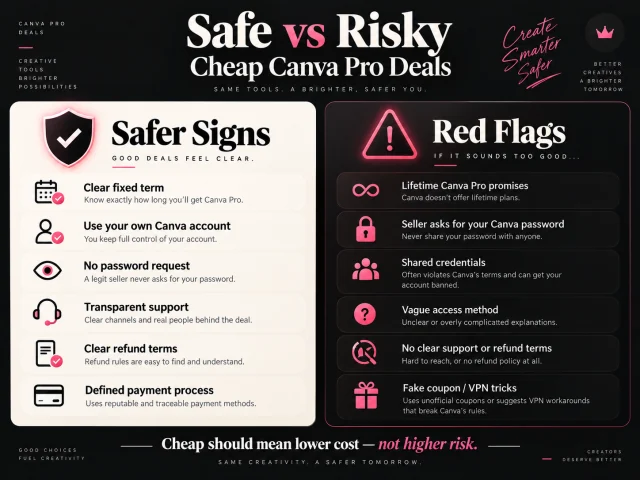
- Safer signs: a clear fixed term, use of your own Canva account, no password request, clear support, clear refund terms and a defined payment process.
- Red flags: lifetime promises, sellers asking for your Canva password, shared credentials, vague access methods, no clear refund/support terms and fake coupon or VPN tricks.
7. Avoid using a VPN just to chase another country’s price
Some websites suggest changing your location to chase a different regional price. We do not recommend building your purchase decision around that. Regional prices, payment requirements and account rules can change, and support becomes more complicated when the billing arrangement does not match your real market.
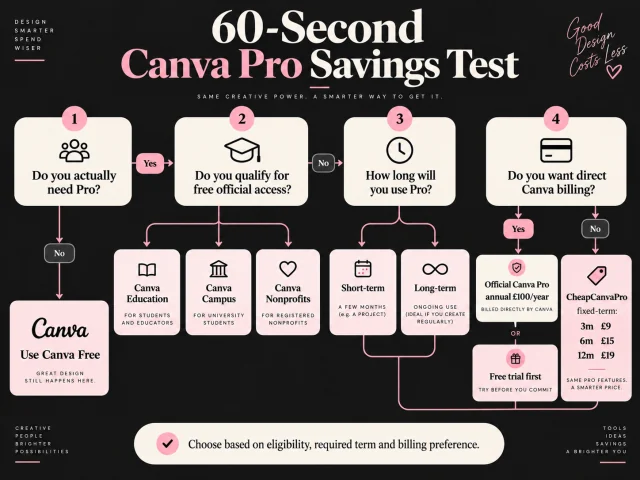
A simple 60-second decision test
Before paying anything, answer four questions:
- Do I actually need Pro? If Free already handles your work, stop there.
- Do I qualify for free official access? Check Education, Campus or Nonprofits.
- How long will I realistically use Pro? A three-month project and a year-round workflow should not automatically choose the same option.
- Do I care more about direct Canva billing or the lowest fixed-term cost? That answer determines what you should compare next.
Which option is cheapest for you?
- You only need basic tools: use Canva Free.
- You are an eligible school user: check Canva Education first.
- You are at a university or college: check whether your institution offers Canva Campus.
- You work for an eligible nonprofit: apply for Canva Nonprofits before purchasing ordinary Pro.
- You want to test first: use the official free trial if your account is offered one.
- You want direct Canva billing all year: use the official annual plan.
- You only need Pro for a short or fixed period: compare defined fixed-term options based on the total cost for the period you need.
Our honest conclusion
The cheapest way to get Canva Pro is not one single deal. It depends on your eligibility, your required term and how much you value buying directly from Canva.
If you qualify for official free access, that is usually the strongest answer. If you do not qualify, the most rational next step is to compare the official trial, direct annual billing and clearly described fixed-term options based on the amount of time you genuinely need Pro.
That is the real decision framework. It is more useful — and more honest — than simply repeating “cheap Canva Pro UK” and chasing the smallest number you can find.
Frequently asked questions
If you qualify, Canva Education, Canva Campus or Canva Nonprofits can provide premium access at no personal subscription cost. If you do not qualify, compare Canva’s free trial, direct annual billing and clearly described fixed-term options based on how long you actually need Pro.
Canva currently lists Canva Pro at £100 per year for one person on its UK pricing page.
Yes. Canva advertises a Pro free trial. Check the duration and renewal terms shown during signup or checkout.
Primary and secondary students can access Canva Education through an eligible teacher or school. University and college students may receive premium access if their institution provides Canva Campus; otherwise they can use Canva Free or buy Pro.
Canva’s higher-education material directs students toward Canva Campus where available. It does not present a general individual higher-education discount for Canva Pro or Business.
Eligible primary and secondary teachers can use Canva Education free after verification.
Eligible registered nonprofits can apply to Canva Nonprofits. Canva says approved organisations receive premium features and collaboration tools for one team of up to 50 users free.
Yearly billing usually lowers the effective monthly cost. Canva’s UK pricing page currently lists Pro at £100/year for one person, which works out to about £8.33/month across a full year.
It depends on the offer. Prefer clearly stated terms, your own Canva account, transparent support/refund information and a defined access period. Avoid sellers asking for your password, shared credentials or vague lifetime promises.
We do not recommend relying on regional-pricing workarounds. Prices, payment requirements and support expectations can become more complicated when the billing arrangement does not match your real market.
Compare the option that fits your term
If you have checked Free, Education, Campus, Nonprofits and the official trial and still want a paid option, compare the current 3, 6 and 12 month plans before deciding how long you actually need premium access.