
For UK freelancers who regularly create client graphics, social content, presentations, proposals or marketing assets, Canva Pro can be worth paying for when its tools save recurring production time. Canva currently lists Pro at £100 per year for one person in the UK, with 5 Brand Kits, 100GB storage, premium templates and media, Background Remover, resizing tools, social scheduling and higher AI access than Free.
For freelancers, the strongest reason to upgrade is not the size of the template library. It is whether Brand Kits, background removal, resizing and integrated assets remove enough repetitive client work to justify the annual cost. If Canva is only an occasional tool, Free may already be enough.
Canva can change prices, feature limits and licensing terms. Check the current Canva pages before purchasing or transferring client work.
What do freelancers actually use Canva for?
Canva can sit inside many freelance workflows. Social media managers may create posts, Stories, LinkedIn graphics, ads and short promotional videos. Marketing freelancers may build presentations, proposals, lead magnets, reports and campaign assets. Other freelancers may use Canva for moodboards, media kits, portfolios, PDF guides, thumbnails, simple website graphics and product images.
The value of Pro therefore depends heavily on frequency and repetition. A freelancer creating 40–50 client assets every month has a very different use case from someone opening Canva once every few months.
The useful question is not whether Pro contains more features. It does. The better question is: “Do those features remove enough repeated work from my client workflow to justify £100 a year?”
Canva Free vs Pro for freelancers
Canva Free is capable enough for many simple client tasks. Pro becomes more relevant when the same production bottlenecks appear repeatedly.
| Area | Canva Free | Canva Pro |
|---|---|---|
| UK annual price | £0 | £100/year |
| Templates | 1.6M+ | 3.6M+ |
| Photos, video, graphics & audio | 4.7M+ | 141M+ |
| Brand Kits | 1 limited kit | 5 |
| Storage | 5GB | 100GB |
| Social scheduling | Not included | Included |
| Background removal / advanced design tools | Limited | Included |
| Best fit | Occasional/simple work | Regular client production |
Canva currently positions Pro toward solo creators, which makes it the most obvious paid-plan comparison for an individual freelancer. But more features only matter when they solve problems that actually exist in your workflow.
Is £100 a year worth it for a freelancer?
Canva Pro's current UK annual price is £100 for one person. Dividing that annual price by twelve gives an average cost of about £8.33 per month. That is a cost-equivalent calculation, not a statement that Canva bills £8.33 monthly.
For a freelancer, the more useful comparison is against the value of working time. At £30 per hour, £100 represents roughly 3 hours 20 minutes of work across an entire year. At £50 per hour, it represents two hours.
There is an important limitation: saved time is not automatically earned money. The financial case is strongest when saved production time can be used for more client work, prospecting, faster delivery or higher-value tasks.
Managing multiple client brands
This is one of the clearest freelancer use cases for Canva Pro. A freelancer may simultaneously work with a restaurant, estate agent, fitness coach, ecommerce brand and local service company. Each client can have different logos, colours, fonts and recurring templates.
Canva Free currently includes one limited Brand Kit, while Canva Pro includes five Brand Kits. For freelancers managing several recurring clients, this can reduce repetitive setup and lower the chance of using the wrong logo, colour or font.
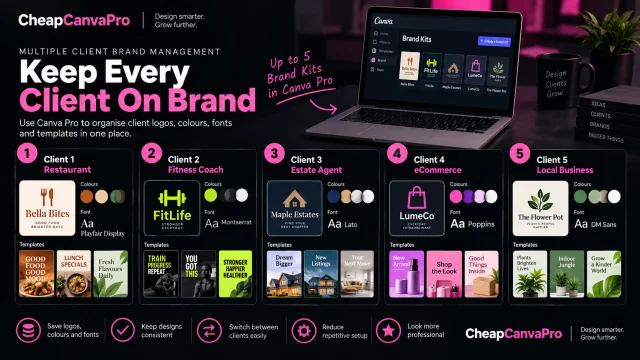
Five Brand Kits can still become a limitation. A freelancer managing a large portfolio of active brands may eventually need a different organisation system or compare Canva Business, which currently offers a much larger Brand Kit allowance and stronger collaboration controls.
Where Pro can save production time
Premium assets
Canva Pro currently provides access to a much larger premium media library than Free. The practical value is not the headline number of assets; it is reducing the need to leave Canva, search another stock site, check licensing, download a file and import it back into the project.
If clients already supply all photography, illustration and brand assets, this benefit may be much smaller.
Background Remover
Background removal can be particularly useful for product graphics, ecommerce work, restaurant promotions, portraits and thumbnails. If preparing each image elsewhere adds only a few minutes, repeating that task across dozens of client assets can quickly become significant.
Resize and campaign variations
A single client campaign may require an Instagram post, Story, Facebook graphic, LinkedIn post, presentation slide and email banner. Pro's resizing tools can provide a faster starting point than rebuilding each size manually, although every resized design should still be checked and adjusted.
Social scheduling
Canva Pro includes Content Planner, which can reduce tool switching for freelancers who both design and schedule social content. If you already use a dedicated social-media management platform, however, this may duplicate functionality rather than add meaningful value.
AI tools
Canva Pro also provides higher AI allowances than Free. AI can help with ideation, copy, visual generation and editing, but it should not be the sole reason to upgrade unless those tools already play a recurring role in paid client work. AI features and limits can change more quickly than core workflow tools.
The billable-hour value test
A useful decision test is to ask how much time Canva Pro would need to save each year to equal its £100 annual cost in working-time value.
| Your working-hour value | Time equal to £100 |
|---|---|
| £20/hour | 5 hours/year |
| £25/hour | 4 hours/year |
| £30/hour | 3h 20m/year |
| £40/hour | 2h 30m/year |
| £50/hour | 2 hours/year |
| £75/hour | 1h 20m/year |
| £100/hour | 1 hour/year |
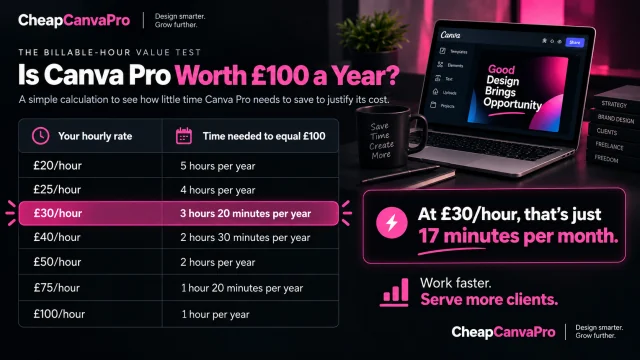
For example, a freelancer valuing their work at £30/hour only needs to eliminate roughly 17 minutes of repetitive work per month for the saved-time value to equal £100 over a year. That could come from faster background removal, fewer stock searches, quicker brand setup or faster resizing.
This is a decision framework, not a promise of extra income. If none of those tasks slow you down, Pro may still be unnecessary.
Practical example: a freelance social media manager
Imagine a UK freelancer managing four regular clients. Each month they create 12 posts per client, 8 Stories per client and several campaign variations. That is already dozens of assets before one-off promotions are counted.
With Free, the freelancer can still produce professional work, but may repeatedly search for free assets, re-enter brand information, recreate dimensions, use another background-removal tool and export files into a separate scheduler.
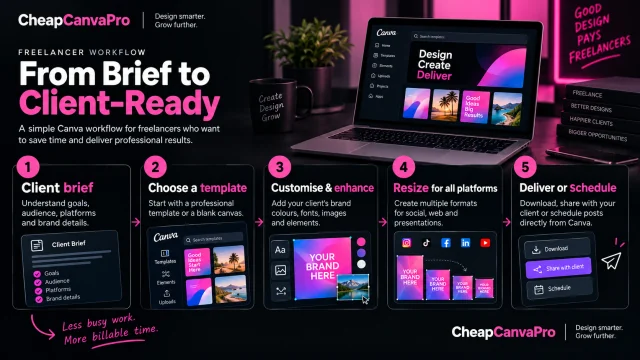
With Pro, the workflow can potentially become: client brief → choose the client's Brand Kit → create the base design → use suitable premium assets → edit images → resize campaign formats → schedule or export.
Pro does not guarantee better creative work. Its value is reducing friction across repeated tasks.
Client licensing and handover: what freelancers should know
Canva permits many commercial uses of designs containing eligible Free or Pro Content, including promotional material, social posts, presentations and brochures. However, Canva content remains subject to its licence terms.
Transferring a design to a client
Canva's current Content License Agreement allows a design containing Canva content to be transferred to a client for that client's own use, subject to conditions. The agreement says the transfer should be covered by a written agreement with the client, the client's use must follow Canva's terms, and a design containing licensed Canva content can only be transferred to one client.
Standalone Pro assets are different
A freelancer should not treat a Pro subscription as permission to download a Canva stock photo, illustration or other Pro asset and hand that standalone asset to a client for unrestricted use. Canva's licence places restrictions on redistributing Pro Content as standalone content.
Education access is not a commercial-work shortcut
Canva's licence states that Education users may use Pro Content for educational, non-commercial purposes. Freelancers with institutional access should therefore not assume an Education account substitutes for an appropriate commercial workflow.
When Canva Free is enough for a freelancer
Canva Pro should not be treated as a compulsory business expense. Free can remain the better choice when:
- you rarely use Canva;
- clients supply finished photography, graphics and brand assets;
- your designs are simple and do not require repeated resizing;
- you already pay for stock media, background removal and scheduling elsewhere;
- your current Canva workflow has no obvious recurring friction.
If Free handles paid work efficiently, there is no need to manufacture a problem simply to justify another subscription.
Canva Pro or Canva Business for freelancers?
Most solo freelancers should compare Free and Pro first. Business becomes more relevant when a freelancer manages many recurring brands, works with subcontractors, operates more like a small agency, needs approval workflows or requires stronger administration and collaboration.
A solo freelancer with a small number of regular clients does not need Business merely because the work is commercial.
The “last 10 projects” test
Before upgrading, review your last ten paid projects and mark every time you:
- removed backgrounds manually or in another tool;
- rebuilt the same design in several dimensions;
- searched elsewhere for stock content;
- re-entered client colours, fonts or logos;
- avoided a useful premium asset;
- moved content into another scheduling tool;
- spent significant time organising repeated client assets.
If these limitations appeared in only one or two projects, Free may already be doing the job. If they appeared across most of the ten projects and repeat every month, you have evidence of workflow friction worth pricing against the £100 annual cost.
Frequently asked questions
It can be for freelancers who use Canva regularly for paid client work. The clearest value usually comes from reducing repeated production work through Brand Kits, premium assets, Background Remover, resizing and scheduling.
Canva's UK pricing page lists Pro at £100 per year for one person. Canva can change pricing, so check the official page before purchasing.
Canva permits many commercial uses of finished designs containing eligible Canva content, but its licensing conditions still apply. Check the current Content License Agreement for the assets and use case involved.
Yes, subject to Canva's client-transfer conditions. Canva's current licence calls for a written agreement with the client, requires compliance with Canva's terms and limits a design containing licensed content to transfer to one client.
Not as unrestricted standalone Pro Content. Canva's licence restricts copying, downloading or distributing Pro Content as a standalone item outside the permitted design use.
Canva's current UK plan comparison lists five Brand Kits with Pro. This can be useful for a freelancer managing several recurring client brands.
Potentially. Brand Kits, premium media, resizing and Content Planner can reduce repeated steps for freelancers managing recurring social content.
Solo freelancers will often find Pro sufficient. Business becomes more relevant with many brands, team collaboration, subcontractors, approvals or stronger administration requirements.
Canva's Content License Agreement limits Education use of Pro Content to educational, non-commercial purposes. Commercial client work should use an appropriate separate account and workflow.
Review your last ten client projects and calculate how much time you spent working around Free-plan limitations. If those workarounds repeat and their time cost exceeds what the subscription is worth to you, Pro becomes easier to justify.
Final decision
Canva Pro is most valuable to freelancers when it works as a production-efficiency tool, not simply as a larger template library. A freelancer creating client work every week may recover the £100 annual cost through relatively small time savings across image editing, brand setup, resizing and asset sourcing.
If Canva Free already supports your workflow without frequent workarounds, paying for extra features is unnecessary. Measure the friction in your real projects first, then decide.
For related comparisons, see our Canva Free vs Pro UK guide, current Canva Pro UK pricing guide, and Canva Pro for UK small businesses.
Choose the term that fits your client workflow
Compare the available fixed-term options after deciding whether Canva Pro genuinely saves enough time in your freelance work.